FAQ · Billing
How to purchase a CopVPN subscription?
AnswerThe full answer
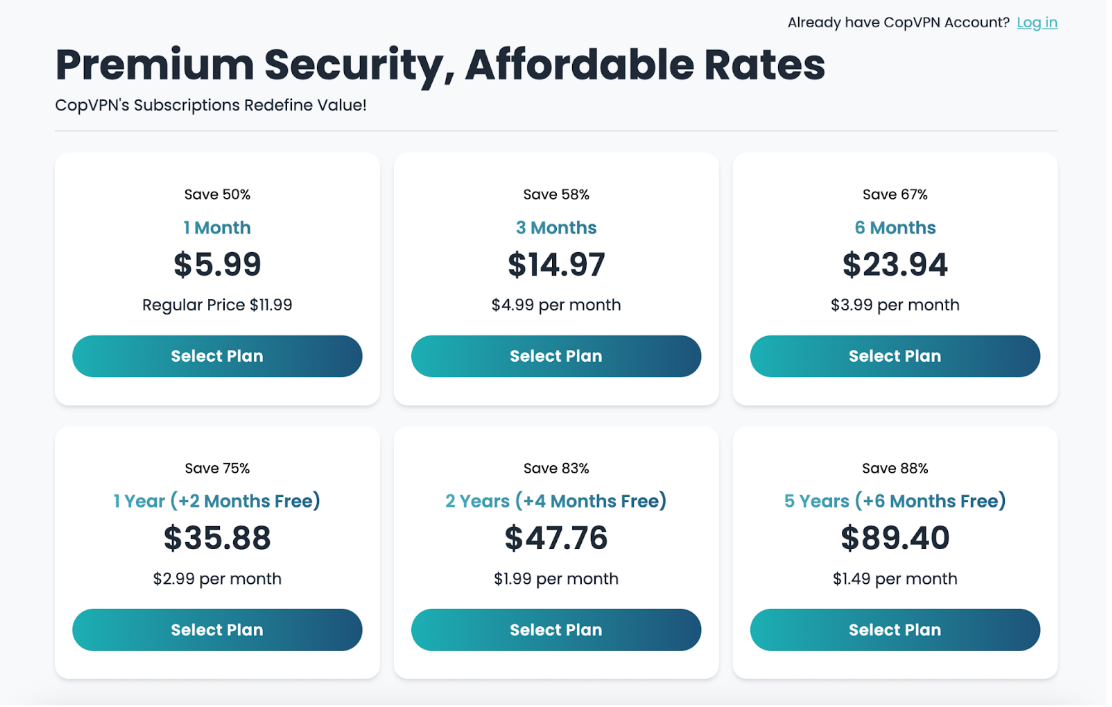
Log in to your CopVPN account, navigate to the “Pricing” section, and select a VPN plan that suits your needs.
Then, enter your card’s information and click the ‘Pay now’ button. Your CopVPN subscription is now successfully activated.
Also, you can purchase a CopVPN subscription through the Apple App Store or the Google Play Store.
Billing line · 14 questions
Other questions on the Billing line
You’re reading question 2 of 14 on the Billing line. Pick another question, or switch to another line.
Billing line14 questions
- 01What payment methods does CopVPN accept?
- 02How to purchase a CopVPN subscription?You’re reading this one
- 03Does CopVPN have a free trial?
- 04If I sign up for 1 month, can I upgrade later?
- 05Why is my CopVPN account status still free?
- 06How can I renew my CopVPN subscription?
- 07How to cancel the auto-renewal of my subscription?
Still stuck? Email contact@copvpn.com
It’s our only support address. Tell us the device and app you’re using, and what you’ve already tried.
Plans
Start free, or unlock every location
A plan unlocks every CopVPN app on your account: 85+ locations in 65+ countries, 5 protocols, and unlimited devices, up to 7 connected at once.
30-day money-back guarantee (except crypto and manual payments)We follow a no-logs policy